



There are a lot of resume builders you could use in your next job search, but how do you choose?
We tested the top 10 AI resume builders in the 2026 job market, using a standardized framework, which we’ll share in a moment.
In this report, you’ll learn how each resume tool rates in:
- Ease of use and experience
- AI features and accuracy
- Template quality and flexibility
- Free vs. premium value
- Support and resources
- Extra tools and features
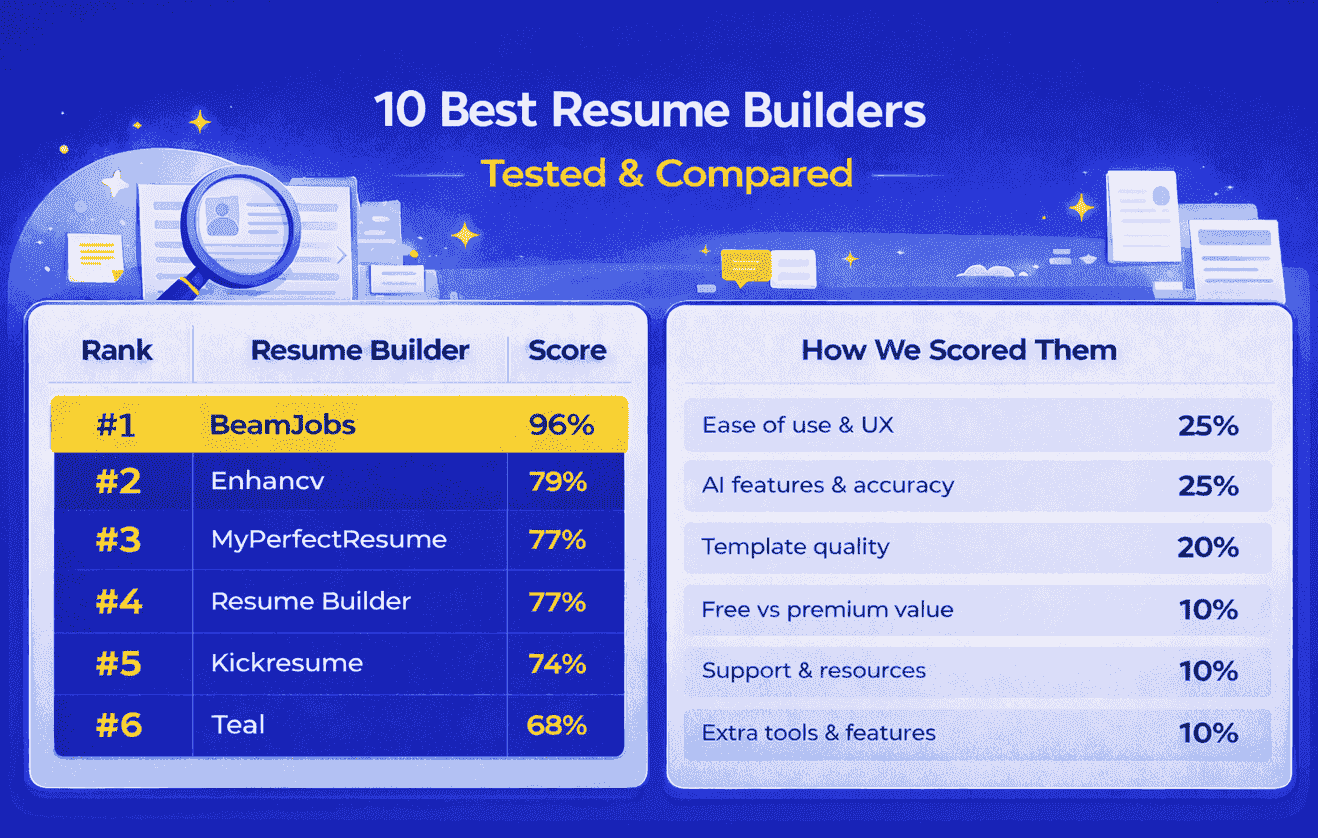
TL;DR: Though each of these builders made the list because they’re genuinely good tools. BeamJobs stood out for its user experience and AI features.
How We Tested and Ranked These Best Resume Builders
For each resume builder, we examined six categories, putting the majority of the weight on user experience and AI capabilities because:
- A resume builder loses a lot of usefulness if it isn’t easy for the job seeker to navigate.
- Additionally, having effective AI assistance adds a lot of value, but generic AI generation is frustrating and makes for a low-quality resume.
- Plus, ATS-friendly templates ensure the builder produces layouts easily read by ATS.
Our senior content manager, Lisa, and content specialist, Arnold, helped me review our top 10 list methodically and extensively using the following categories and weights in the table below.
Category | Weight | What we evaluated |
|---|---|---|
Ease of use & user experience | 25% | How intuitive and efficient the builder feels across navigation, onboarding flow, inline editing, and live previews. |
AI features & accuracy | 25% | How effectively the AI generates relevant, recruiter-ready content (bullets, skills, summaries, tone). We measured accuracy, adaptability, and edit flexibility. |
Template quality & flexibility | 20% | The professional appeal, readability, and variety of available templates. We tested how well each adapted to different roles, industries, and ATS. |
Free vs. premium value | 10% | How much value users can get before paying, and what premium unlocks (downloads, extra AI features, etc.). |
Support & resources | 10% | Quality and accessibility of support articles, tutorials, or customer service. |
Extra tools & features | 10% | Useful additions like cover letter builders, LinkedIn optimizers, job trackers, or grammar checkers that extend value beyond resume creation. |
In each resume builder’s in-depth report, we also include a few screenshots to help you visualize the differences.
We chose not share exact prices for any builder because pricing can change abruptly.
#1. BeamJobs
Quick verdict: BeamJobs combines the traditional resume-building process with AI to create personalized, job-ready documents with minimal effort on your end. It’s best for professionals who appreciate classic formatting but also want the benefits of smart automation that matches resumes to specific jobs and industries. This makes building a resume quick, efficient, and easy, while still feeling familiar and up-to-date.
Ease of use and experience: 5 of 5 points
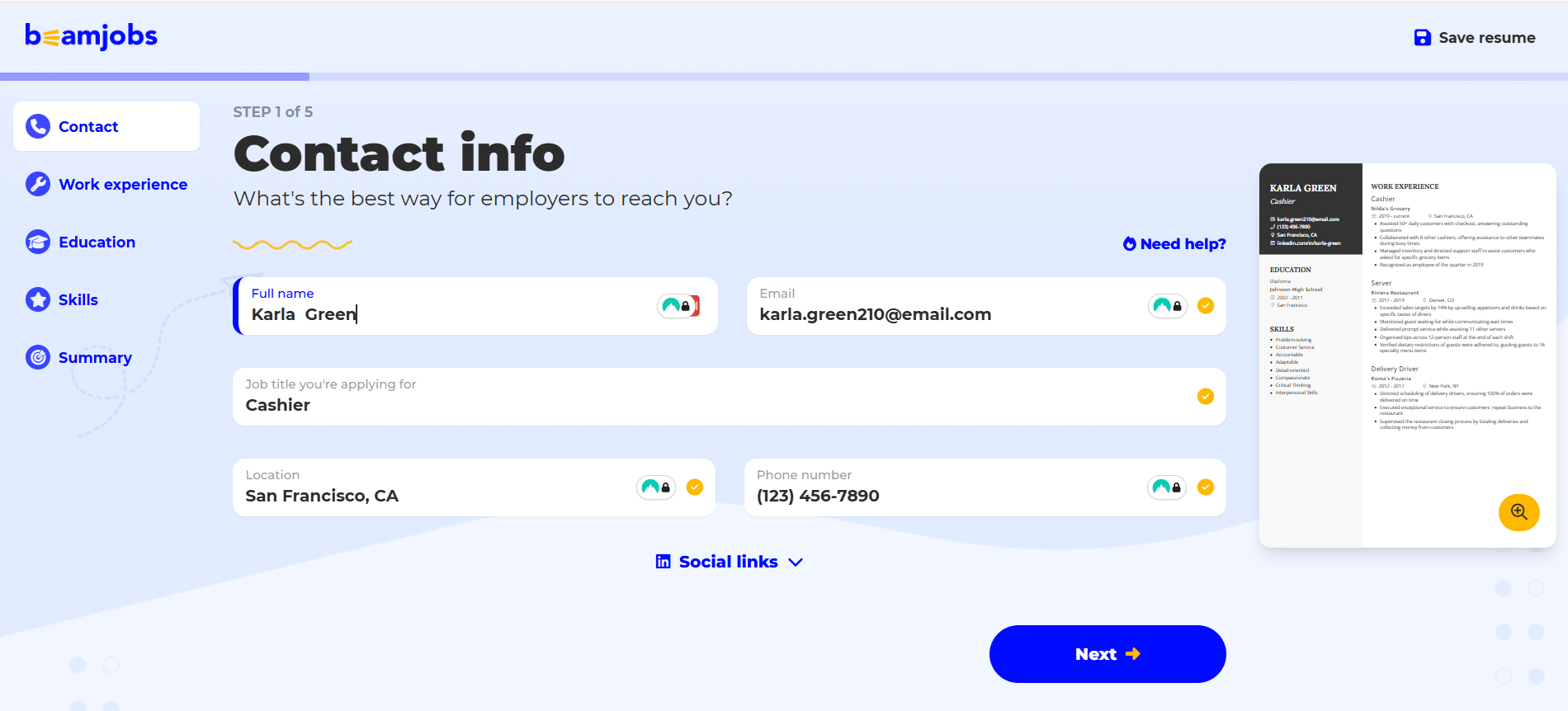
BeamJobs offers a resume builder that is easy to use and prioritizes the job seeker’s needs. It strikes a balance between user control and simplicity. Onboarding is seamless, and editing happens in real-time. Every step is intentional, and navigating the tool is intuitive, even if you’re new to resume building.
Pros:
- Effortless onboarding and section-by-section navigation
- Pre-filled resume templates guide users on what to write (if you don’t upload an existing resume), so you never have to worry about starting from a blank page
- The user-friendly interface is modern and minimal, making it feel fresh and quick
- You can edit your resume in the workflow and see your changes happening in the preview window, or you can edit directly on the page, like a Google Doc
- The platform is simple and without distraction, allowing you to focus on your resume content
AI features and accuracy: 5 of 5 points
BeamJobs effectively leverages AI to create recruiter-ready, role-specific resumes that align with both ATS standards and human expectations. The AI features go beyond automation as they guide users to produce content that’s targeted, relevant, and nearly submission-ready with minimal editing required. It also ensures you can download your resume in standard formats like PDF or Microsoft Word document.
Resume summary:
- AI-generated summary pulled directly from our inputs, including work history, skills, and job target, resulted in a compelling, personalized statement
- Needed only light polishing to be suitable for hiring managers
Work experience bullets:
- Pre-filled templates included many strong examples, even before using AI
- AI bullet points were impressive, especially in these key areas:
- Started with strong and relevant active verbs
- Integrated metrics, results, and relevant skills without overkill
- Maintained ideal bullet point length
- Varied sentence structure
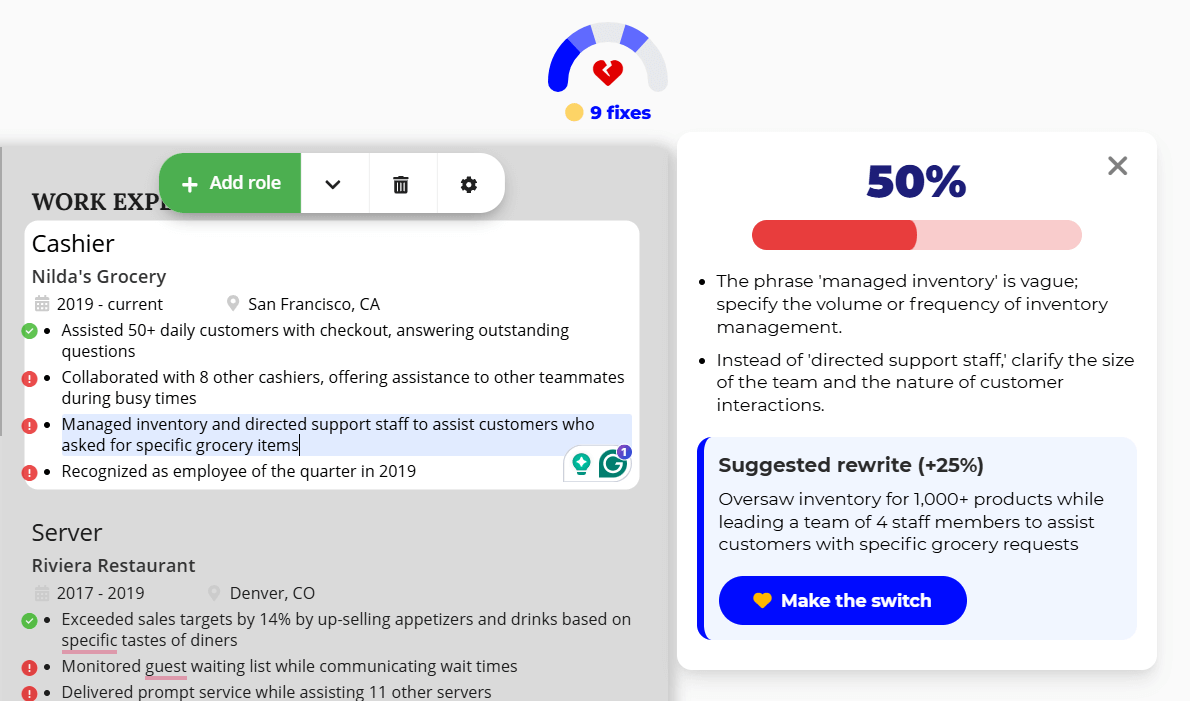
- BeamJobs highlighted weaker bullet points and suggested better options with corresponding improvement scores. This feature was exceptional for quality control
- Job seekers get granular-level feedback on work experience bullet points, rather than generic blanket generation or rewrites
Skills section:
- The pre-filled skills section gave a solid starting point, using examples from real, successful, and great resumes
- AI also generated a separate list of skills, which were focused, job-specific, and balanced for ATS visibility, for the job seeker to pick and choose from
Template quality and flexibility: 5 of 5 points
BeamJobs keeps it simple and that’s a good thing. Instead of overwhelming users with dozens of lookalike templates, it offers a curated set of nine distinct, ATS-friendly resume designs. Each is named and described to make choosing easy and intentional.
Template highlights:
- Each template serves a purpose, clearly labeled in a way that hints at when to use it (e.g., modern, professional, classic)
- Designed for visibility, recruiter readability, and ATS scanning. No wasted design fluff
- Includes all the essential sections to build a complete, professional resume tailored to U.S. job market standards
- Quick-switch allowed us to preview and compare all nine effortlessly
In short, less was more. We didn’t need 50 templates; these 9 well-crafted ones made the decision fast, and the result was job-ready.
Free vs. premium value: 5 of 5 points
BeamJobs delivers significant value in its free tier, demonstrating the value of upgrading. We built a complete, high-quality resume without creating a free account, and by the time we reached the download step, the premium upgrade felt like a worthwhile investment.
We believe the free experience is strong enough to prove BeamJobs works, so upgrading feels more like unlocking potential than removing limitations.
Free:
- Access to all resume templates
- Full ability to build every resume section
- Limited AI content generation for resume summaries and bullet points
- No account required until you’re ready to download
Premium:
- Build unlimited resumes and cover letters
- Full and unlimited access to the complete AI tool suite
- Advanced AI assistance across summaries, bullet points, and skills
- Access to extra job search resources beyond resume creation
Support and resources: 4 of 5 points
BeamJobs provides exceptional customer support and comprehensive user resources. Whether you’re troubleshooting, seeking advice, or need guidance, support is simple, responsive, and human. BeamJobs is a team of real people ready to help.
Pros:
- Get a response within one business day when you email [email protected]
- Find resume examples and how-to guides for most professions
- Users rate BeamJobs 4.9 out of 5 stars on Trustpilot, with the vast majority of reviews praising customer support for quick response times, kindness, and dependable solutions
Cons:
- Though BeamJobs has a quick email response time, some users may be deterred with the lack of a chat feature or phone number.
Extra tools and features: 4 of 5 points
BeamJobs’ extra features and tools are intentional, practical, and helpful. Some highlights include:
- The AI bullet point generator: There’s no generic AI filler but focused, role-specific content tailored to the target job in a human way. It flagged weaker bullets and suggested improvements, complete with a percentage score showing how much stronger our resume could be with the change.
- The LinkedIn import tool: We entered our profile URL, and BeamJobs guided us to create a complete resume draft. It saved us time and ensured consistency between our online and offline presence. These tools also save time writing and make the entire process feel more streamlined from resume draft to application materials.
- The cover letter generator: Paste the job description or a job posting, and this AI tool will draft a cover letter customized to your resume and the job. You can also download a free cover letter template to match your resume.
- The resignation letter generator: BeamJobs makes a typically difficult task quick and straightforward, helping users leave their jobs on good terms without struggling over the right words.
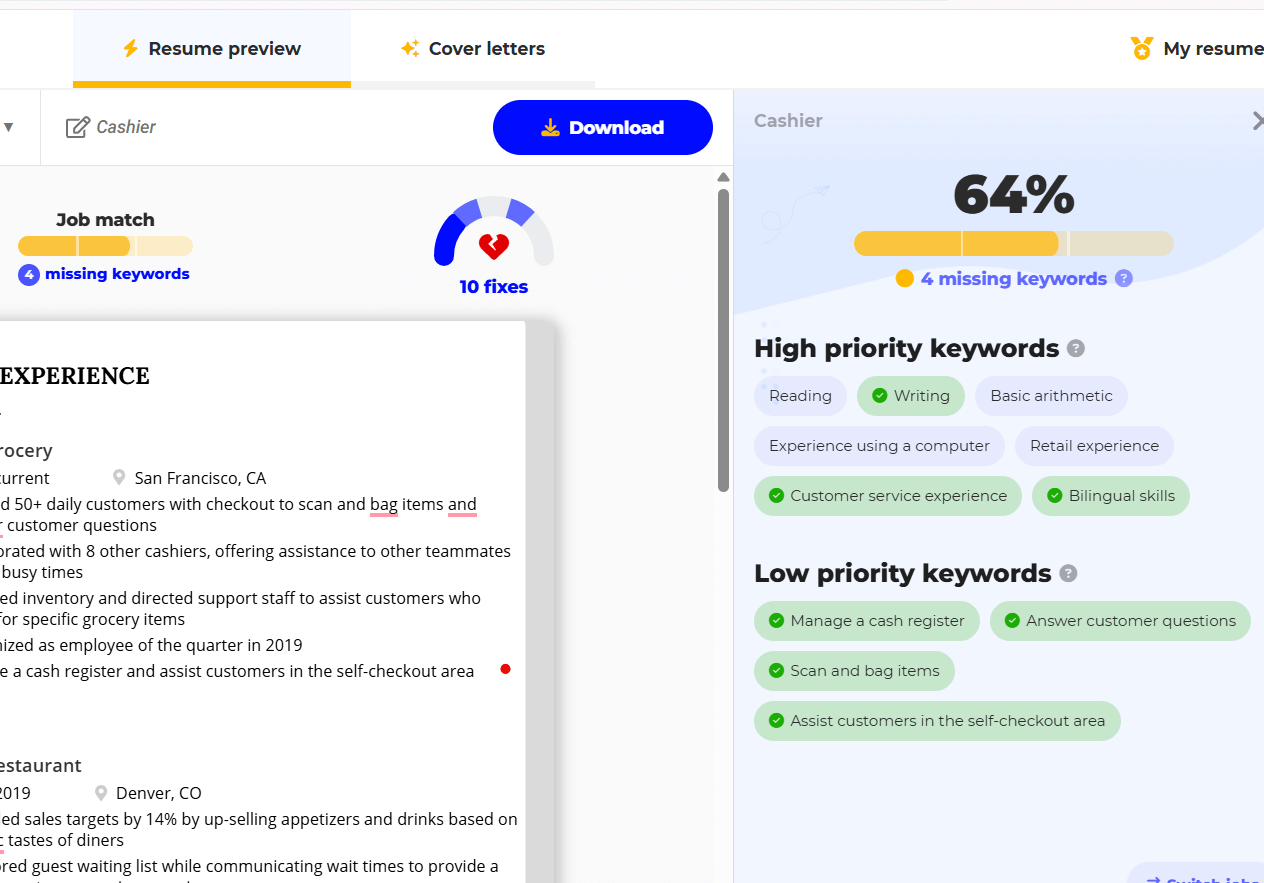
BeamJobs’ newest feature, the job matcher, is also worth an honorable mention. With more enhancements to come, it’s an efficient way to see how well your resume aligns with the job description.
A feature BeamJobs doesn’t yet have is AI interview prep. We saw a couple of other platforms with this feature and think this is a useful feature.
#2. Enhancv
Quick verdict: Enhancv is a well-rounded, modern platform hinged on AI-driven tools designed to simplify resume-building for professionals at a pocket-friendly price point. While the platform delivers strong utility in resume building and design, its AI-generated content can fall short in accuracy and depth, requiring users to make significant tailoring to suit the role and career goals.
Ease of use and experience: 3 of 5 points
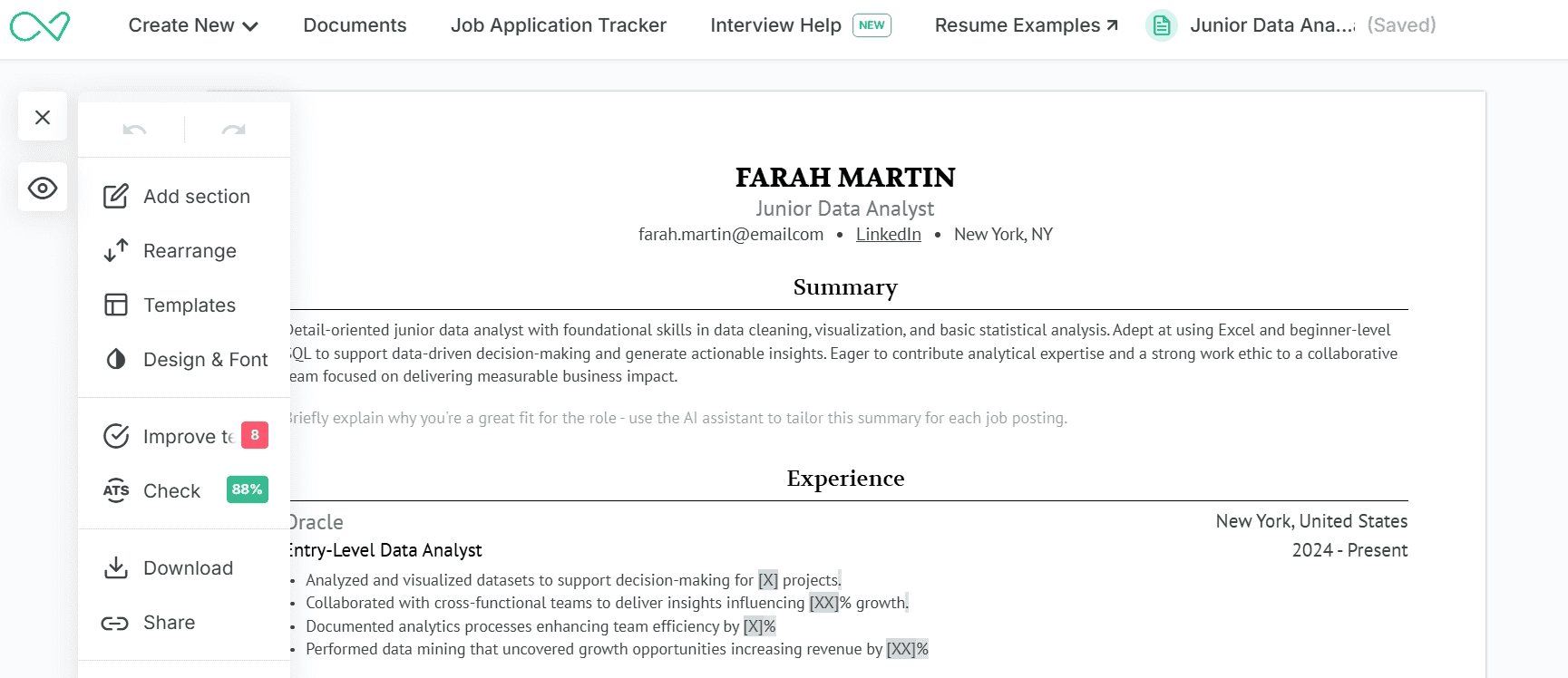
Enhancv offers a clean resume-building flow, with in-line editing and step-by-step guidance. However, some key features—like design controls—are hidden behind less obvious icons, which slowed us down as new users.
Pros:
- Smooth onboarding and resume-building flow keep the focus on content creation
- In-line editing allows real-time adjustments without switching views
Cons:
- Design control settings are difficult to find; they are hidden under a three-dot icon in the left corner
- Adjusting margins, spacing, and font sizes is clunky. Users must click tiny +/- icons or drag sliders
- We couldn’t download our finished resume directly from the editing view; instead, we had to navigate to the “Documents” section to access the download option
AI features and accuracy: 4 of 5 points
Enhancv’s AI-generated content is effective, tailoring the resume based on both the role and the specific job description while still being best judged on accuracy.
Resume summary:
- When we entered the job title or pasted the job description, the AI produced a reasonably personalized summary. While it wasn’t a perfect fit, it included relevant skills, career goals, and a concise overview of our background, which can help less experienced users sound professional, though it still required light edits.
Work experience bullets:
- Here, the AI used only basic inputs (role, company, location, dates) to generate bullet points, which clearly indicated we shouldn’t expect very tailored bullet points.
- While the action verbs showed good variety, the content was largely generic and lacked precision. Metrics were often forced or too generalized—such as using percentages in unnatural instances, such as in quantifying efficiency.
Skills section:
- Enhancv allowed us to paste the job description, which the AI used to generate separate lists of hard and soft skills. This was a highlight of the tool.
- However, a few suggestions, such as “data cleaning,” felt overly broad
Template quality and flexibility: 4 of 5 points
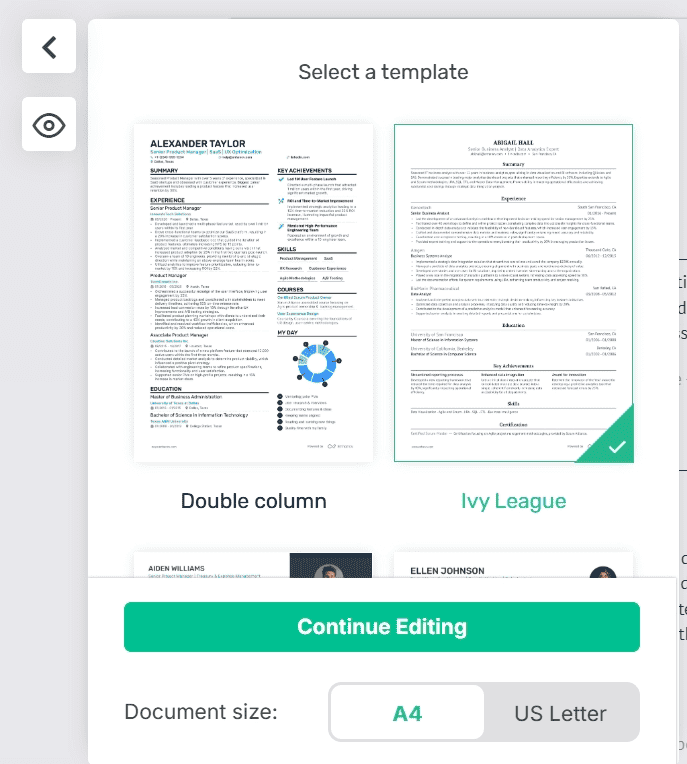
Enhancv’s resume templates strike a strong balance between variety and simplicity. With a curated selection that avoids overwhelming users, it’s easy to switch between designs to fit the users’ specific industries or roles.
We appreciated the ability to turn off certain design elements. Still, the mere suggestion of features like adding a resume background or signature field felt more decorative than functional and could be distracting for many job applications.
Free vs. premium value: 5 of 5 points
Enhancv strikes a clear balance between showcasing value and motivating an upgrade. The free tier allows users to explore core features, including all templates and limited AI assistance, while reserving the most powerful tools for premium access.
Free:
- Access to all resume templates
- Ability to build a limited number of resume sections
- Limited AI content generation for summaries and bullet points
Premium:
- Unlimited resume and cover letter creation (up to 150 documents)
- Full access to all templates
- Unlimited AI content generation for all resume sections
Support and resources: 5 of 5 points
Enhancv has a strong lineup of user support with help articles, FAQs, email, and social channels for Facebook, LinkedIn, and X. Trustpilot reviews tout strong customer service with quick response times.
Extra tools and features: 4 of 5 points
Enhancv offers a solid set of job search tools beyond resume building, with standout features like the AI-powered cover letter generator, recruiter resume review, and its interview prep assistant.
- The cover letter generator impressed us with its ability to pull content from both the job description and our resume, allowing for tailored letters that align with the job and reflect a career story. Users can combine both sources to quickly build a more personalized document.
- The recruiter review feature helps identify missing details in your work experience section, such as incomplete end dates or weak bullet points, and suggests improvements using metrics, active language, and industry-relevant tools.
- We also appreciated the interview help tool, which generates potential interview questions and sample answers tailored to your target role. It’s a practical starting point for prep.
That said, these tools aren’t quite plug-and-play. They offer meaningful guidance but still require significant human review and personal editing before your resume or cover letter is ready for submission—or before walking into an interview fully prepared.
#3. MyPerfectResume
Quick verdict: MyPerfectResume delivers a user-friendly resume builder with professional templates and real-time insights. However, bullet points are drawn from a pre-built pool, while the AI-generated summaries and skills require significant editing and role realignment, as the output isn’t immediately ready for use.
Ease of use and experience: 5 of 5 points
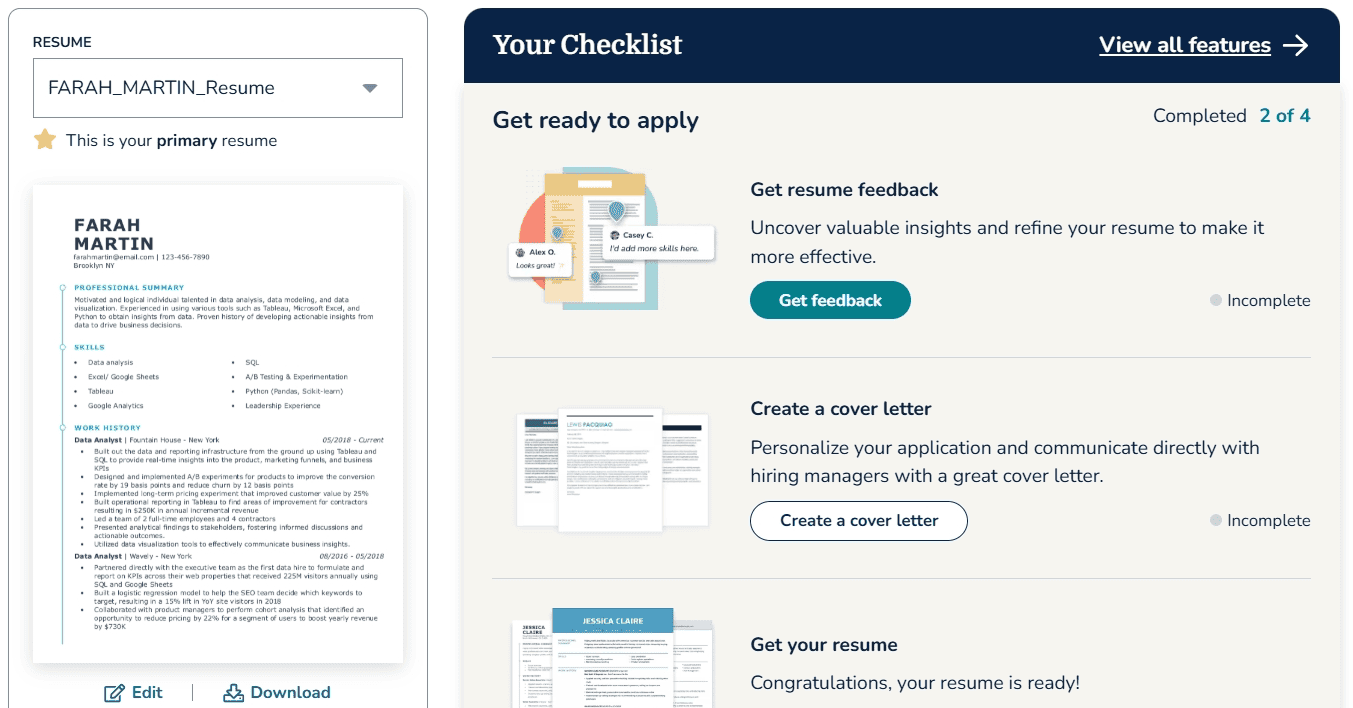
Everything flows smoothly, whether you upload a resume or build from scratch. The builder immediately assigns a template and provides improvement suggestions for each section you add. Additionally, navigation is straightforward, and design controls are easily accessible.
Pros:
- MyPerfectResume’s unique evaluative feedback when you upload a resume makes it easy and quick to see what’s working about your resume and what needs attention
- The experience from uploading to finalizing a resume is personalized and genuinely helpful
- The resume builder platform is easy to navigate and find what you’re looking for
Cons:
- Font size is very limited
- A resume score is available, but we didn’t notice it immediately because it’s tucked away in the bottom right-hand corner
- Even though the builder is easy to navigate, it feels a little dated and not modern
AI features and accuracy: 2 of 5 points
The AI tools are not exceptional. For example, while skills and summaries are generated by AI, they often lack depth, specificity, and measurable impact. Bullets are generic and not in sync with the specifics of the role and industry.
Pros:
- Resume summaries and skills have the option to use AI generation
- Resume score is paired with specific tips to boost structure and impact
Cons:
- Bullet points are not AI-generated but rather come from a pre-built resource
- AI-generated skills and summaries are generic and require significant manual editing
- While resume score insights pinpoint errors, you’re left to figure out how to fix/improve them
Template quality and flexibility: 5 of 5 points
We used a significant number of templates, and we found them polished, modern, and suitable for every professional and role. Customizable features offer some level of user control in changing color palettes, fonts, spacing, and layout without breaking the formatting.
Free vs. premium value: 3 of 5 points
My Perfect Resume offers users a comprehensive resume-building experience for free: create from scratch, upload an existing resume, build your draft section by section, edit, refine, access templates, and create as many resumes as you want.
The free plan was solid, but the premium perks overlap with what we got free, and the real upgrade value isn’t clearly differentiated, so we rated this as average.
Below, we break down what you can get with the free and paid plans:
Free:
- Full access to all templates
- Unlimited editing inside the builder
- Page design and customizations
- Built-in spell checker
Premium:
- Unlimited edits and resume versions
- Matching cover letter builder
- Resume sharing and print options
- Full AI features with improvement suggestions
Support and resources: 4 of 5 points
There is adequate support and reliable resources to ensure users are as well-informed as possible. Platform onboarding is straightforward, and there is no need to refer to any resources, even for a first-time user.
Pros:
- Helpful FAQs and quick explanations throughout the builder
- Section-level guidance for beginners
- Access to support during account creation and checkout
- Diversified support: AI chat, email, phone call, FAQs page
Cons:
- No community or discussion forum
- No expert review of your resume
Extra tools and features: 4 of 5 points
MyPerfectResume offers a solid lineup of tools that enhance the resume-building process without overwhelming the user. You get real-time feedback through a resume score, and can share your resume via email or WhatsApp. There are other thoughtful touches, like the ability to add an availability schedule or professional accomplishments, and publishing your resume on Bold.pro to increase visibility.
However, while the tools get the job done, you still have to polish the bullets, resume summary, and go back and forth in the workflow to edit your resume (due to the lack of in-line editing).
Want to know more? Check out our review of BeamJobs vs. MyPerfectResume >
#4. Resume Builder
Resume Builder and MyPerfectResume are both reputable sites owned by BOLD, with Resume Builder being acquired by BOLD in 2024. When we set out to review Resume Builder, we immediately noticed that the experience was strangely familiar—actually, almost identical.
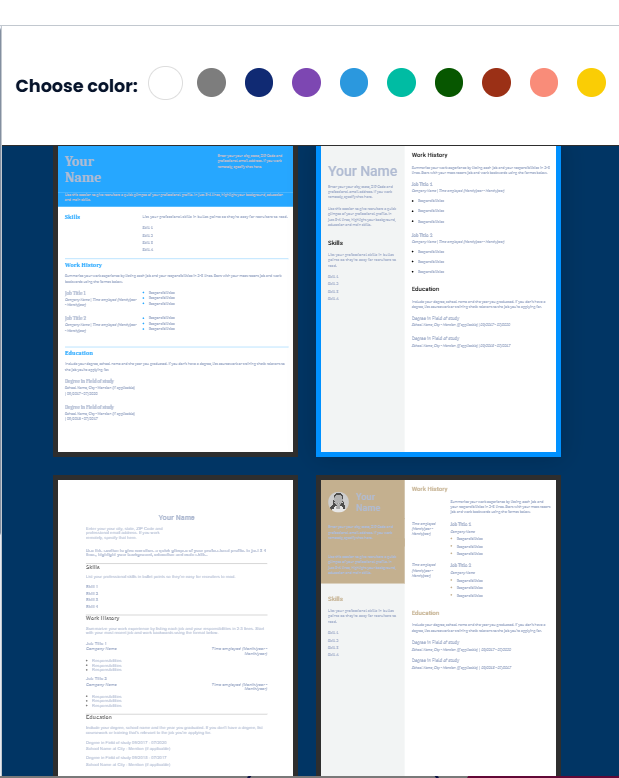
While colors in the platform and resume template choices are different, the builder interface and workflow function the same, even down to the recommended work experience points that are really just pre-written examples (not an AI enhancement).
For those reasons, we did not complete a full review, since the above review of MyPerfectResume applies to Resume Builder. Users can expect the same experience regardless of the platform they choose.
Two things to be aware of:
- Trustpilot reviews are overwhelmingly positive for MyPerfectResume, and although strong for Resume Builder, a few users complain that customer service was unresponsive.
- The resume templates available on Resume Builder feel dated compared to MyPerfectResume’s selection of more modern, professional designs.
#5. Kickresume
Quick verdict: Kickresume has a high-quality and modern platform with access to valuable extra tools for a fair price, though some of the AI features within the builder and the resume template choices have room for improvement.
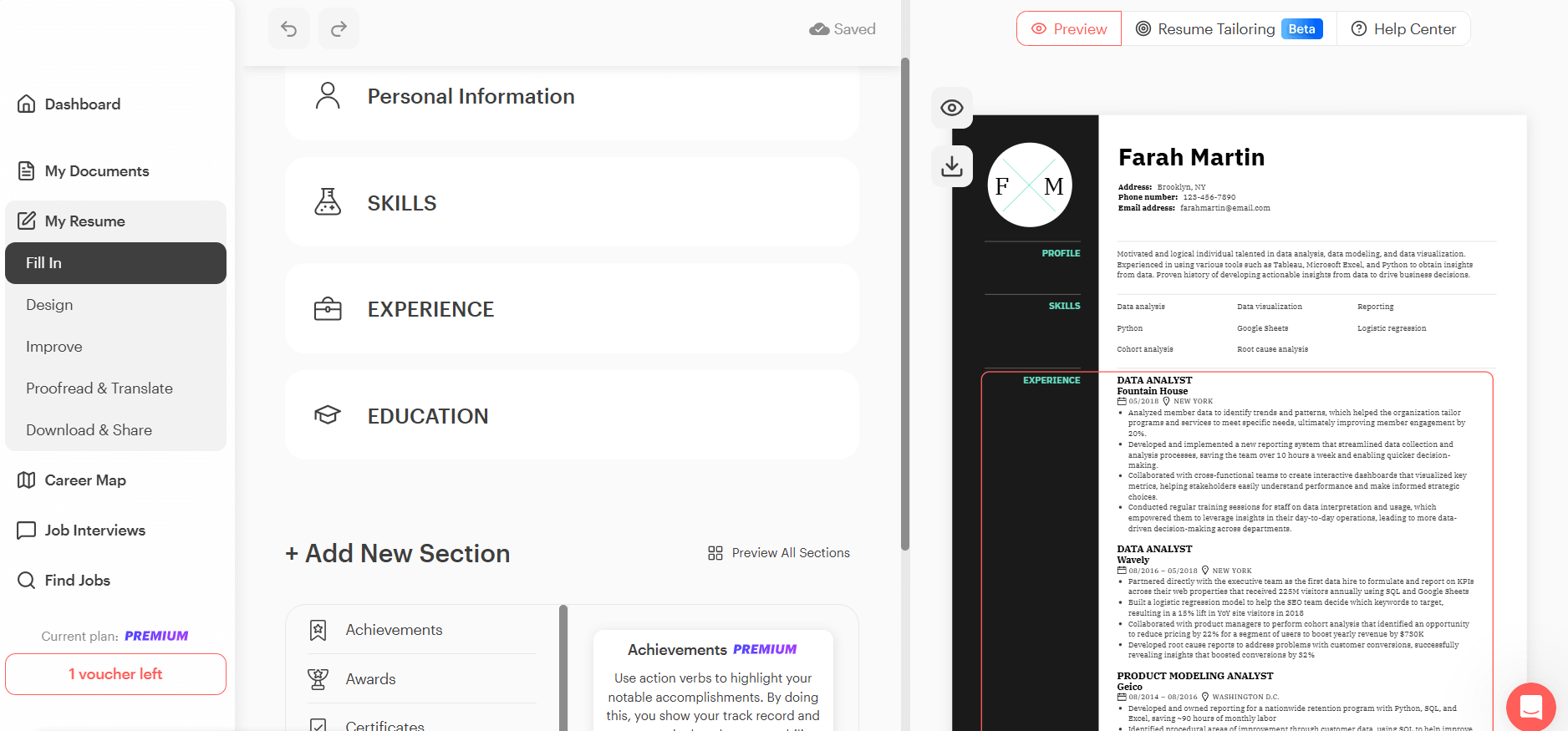
Ease of use and experience: 4 of 5 points
Kickresume’s centralized platform conveniently houses all your job application tools, resources, and support in one place. While the resume builder is mostly intuitive, there is a lot to look at for a first-time user, which can be a bit overwhelming.
Pros:
- While you can’t edit your resume in-line, you do get a large preview window of your resume and can see changes happening in real-time as you navigate through the workflow
- Access the resume builder, job search, interview prep, and career help articles from one location
Cons:
- You can’t create a resume (or even start creating one) until you sign up for a free account
- The resume builder is easy enough to figure out on your second or third visit, but a lot of text on the screen causes the platform to feel cluttered, making the steps to filling in your resume a little unclear at first
AI features and accuracy: 2 of 5 points
AI generation is generic and weaker than we anticipated, and using the features felt more like a chore than an exciting enhancement.
Regarding the work experience section:
- You can’t use AI on one bullet at a time; AI will either rewrite all bullet points within the role or generate completely new content
- AI rewrites are too long, sometimes use “fluff” words, and follow a redundant sentence structure
- We didn’t feel that any of the rewrites made any of our original points more valuable
- The AI skills explorer is an interesting feature, but it requires the user to fill out some information first before receiving suggestions
Regarding the skills and goal sections:
- Job seekers will need to tell the AI what job title they want in order for the tool to generate suggestions (as opposed to the AI using the content of the resume to suggest appropriate skills)
- AI-generated skills are automatically added, meaning you’ll need to remove any you don’t want
- Finally, if you want AI to generate a goal (career objective), this will be generic, too, since the tool bases this off the job title you give it, not the content in your resume
Template quality and flexibility: 4 of 5 points
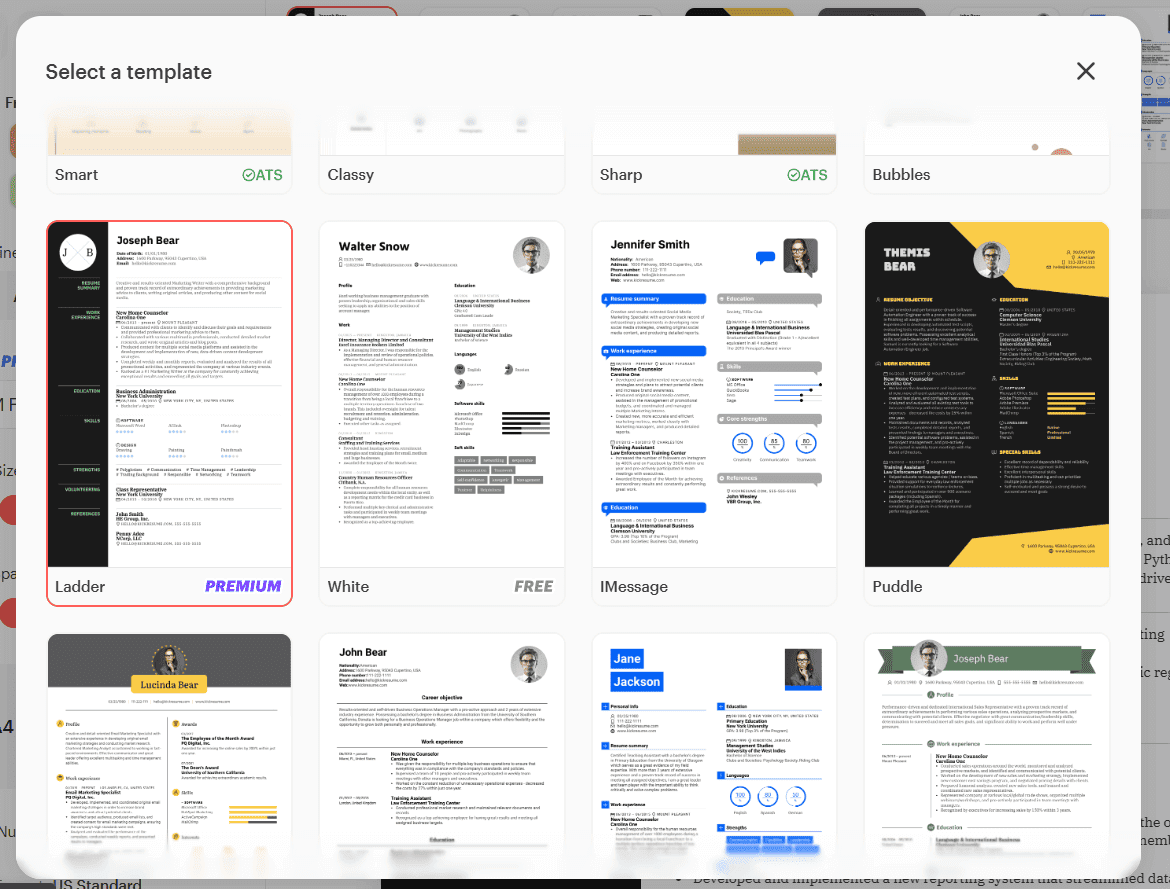
Kickresume has undoubtedly put in a lot of work on creating resume templates. However, we felt like they may have been trying too hard.
At first glance, Kickresume’s templates are fun, creative, and modern, but most of their templates seemed over-the-top with colors, graphics, and graphs. Many include images, which is acceptable in some countries (definitely not in the US), but they do allow you to remove them.
Free vs. premium value: 5 of 5 points
Kickresume’s premium features felt worth the cost. We could do a good deal with the free version. It showed us what was possible but successfully made us want to upgrade to get all the pro features.
Free:
- Build a resume and use limited AI features
- Access to limited templates
- Access to limited design choices
Premium:
- All templates, colors, and typefaces
- Unlimited AI features
- Extra tools like the resume checker and career map
- Priority email and chat support
Support and resources: 5 of 5 points
There is no hunting for resources or support. Open the chat feature positioned in the bottom right-hand corner of the screen to access help articles, FAQs, news, and to send chat messages.
Visit Kickresume’s contact page to send a message through a contact form.
Customer support is strong, as cited by Trustpilot reviews.
Extra tools and features: 4 of 5 points
Kickresume offers several useful tools to support your job search, including a cover letter generator, resume analysis, AI recruiter feedback, and a career map, among other features.
The resume analysis is particularly valuable for ensuring ATS compliance, providing job seekers with a granular look into the style, formatting, and content of their resume that may be holding them back. We also found the resume review to be of high quality; it provided actionable improvement items that genuinely added value to our resume.
The career map, while a cool idea to help you think through where you’re headed, isn’t very actionable and only suggests skills you should pick up. While it does prompt you to build a cover letter or practice interviewing for the role, that seems a little out of place when the idea is to show you possibilities of career paths.
#6. Teal
Quick verdict: Teal offers an intuitive resume builder that makes it easy for job seekers to craft professional, customized resumes fast. Its step-by-step interface flows, making the process natural and stress-free. While Teal offers AI tools to help with content generation, users should expect to make some manual revisions to get everything job-ready.
Ease of use and experience: 3 of 5 points
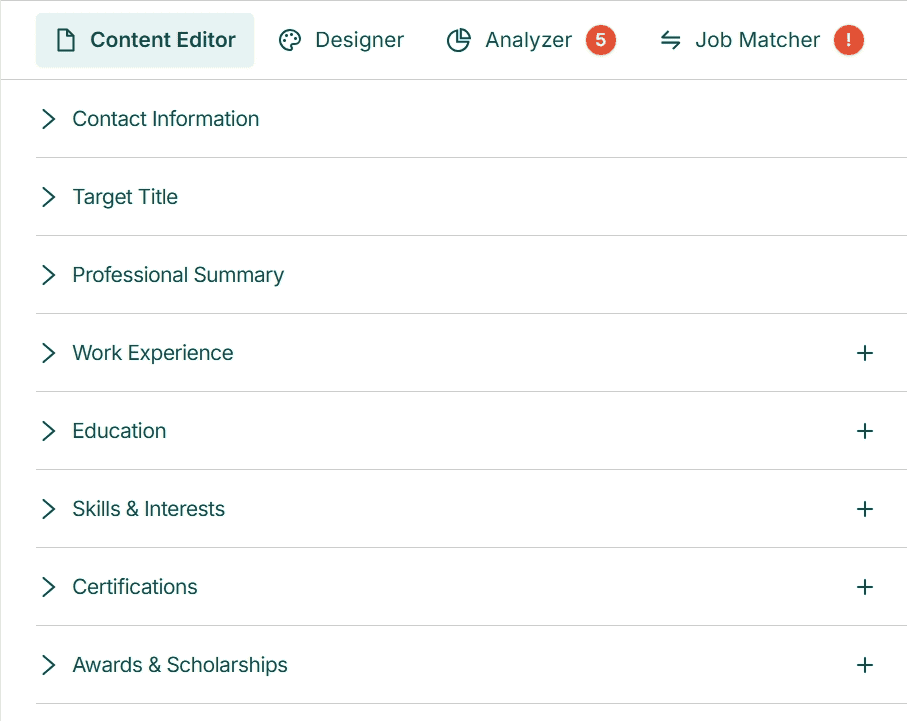
Teal’s resume builder is genuinely easy to use. The process is broken down into clear, guided steps, with helpful prompts (and even checkbox options) to ensure each section is complete. You always know what to do next, and the live resume preview on the right gives instant visual feedback.
Still, some older design choices make the experience dated and less smooth.
Pros:
- The step-by-step process makes it easy to create a resume, even if you’re new to it
- Helpful prompts and checkboxes let you fill out each section quickly
- The live preview shows what your resume will look like as you work on it
Cons:
- Changing margins and font sizes feels dated and awkward
- You can’t edit content directly on the preview by clicking on it
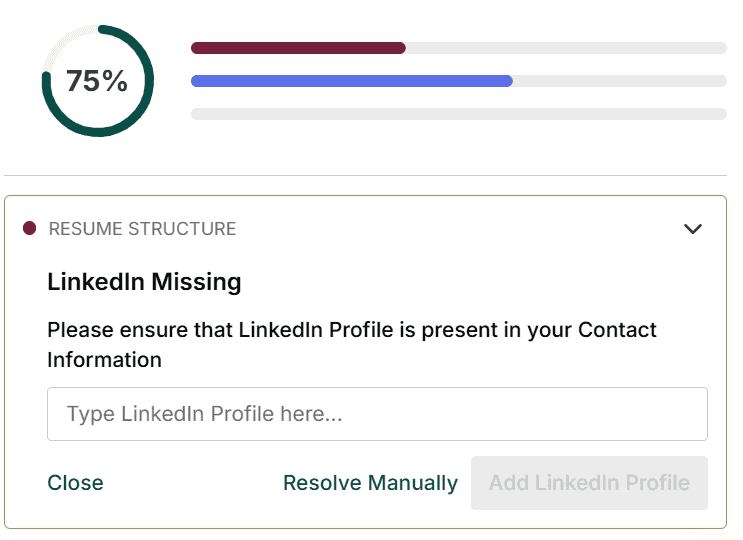
- The resume score mostly gives manual suggestions instead of using AI fixes
AI features and accuracy: 3 of 5 points
Teal brings AI into the resume-building process with the promise of speed and relevance, and in many ways, it delivers. The platform can generate bullet points, suggest skills, and create a professional summary based on your resume content, which saves time.
But while these AI features aim to make personalization easier, the output often needs significant editing to truly match a specific role. The automation is helpful, but not hands-off.
Pros:
- Generating bullet points from scratch with AI, getting automatic skills suggestions, and having an instant professional summary based on your resume are real time savers
Cons:
- Many AI-generated bullet points feel repetitive, often recycling similar achievements and impact statements
- Skill suggestions for improving job match scores were too generic, which works against tailoring your resume for a specific role
- A considerable amount of manual editing is still required to refine bullet points, summaries, and skills before your resume is ready to submit
Template quality and flexibility: 5 of 5 points
Teal is a strong choice here because it offers a wide range of carefully selected resume templates. No matter if you’re applying for a job in tech, marketing, finance, or a creative industry, you’ll find a design that works for you. The platform also lets you easily adjust your resume’s layout, so you can make it your own instead of using a standard format.
Free vs. premium value: 4 of 5 points
When we signed up for Teal, we were guided through a short series of questions designed to tailor the experience to our goals. One question (asking how we heard about Teal) felt a little out of place, but the flow quickly got back on track, leading us straight into resume creation.
What stood out most was the generosity of the free plan. In fact, it offers so much that it blurred the line between free and premium. You can easily build, edit, and download a resume without hitting a hard paywall. Ironically, this abundance made it harder to justify upgrading, which is why we didn’t give this section full points.
Free:
- Almost all templates
- Limited AI-backed features to generate skills, suggest skills, and write a professional summary
- 5 keywords
- Basic resume score and job match score
- Export in PDF
Premium:
- All templates
- Unlimited access to all AI features and tools
- Export in PDF
- Resume score and job match score with AI suggestions for improvements (often require manual resolving)
Support and resources: 2 of 5 points
Teal offers a library of resources covering a wide range of topics and user questions to help you build a resume. However, we couldn’t find a clear way to contact support directly, such as an email or phone number.
Multiple Trustpilot reviews also mention concerns with customer support and communication.
Extra tools and features: 3 of 5 points
Teal brings together several tools to support the job search process, including an AI-powered cover letter generator, a built-in job search, and a job application tracker.
The cover letter generator is particularly helpful for saving time and reducing the effort required to tailor applications. At the same time, the built-in job search feature helps streamline the process by keeping everything in one place. We also found the application tracker to be well-designed; it adds structure and visibility to your progress, helping you stay on top of interviews and follow-ups.
That said, the value of these tools hinges on individual needs. The AI-generated content for the cover letter, for instance, will require significant personalization to be relevant. The job search results must be accurate and varied to be useful. All in all, the platform offers a strong foundation, but some users—particularly those with niche or senior-level needs—might find it less tailored to their needs.
#7. Resume Genius
Quick verdict: Resume Genius is easy to use with its pleasing-to-the-eye interface. It does a good job of helping first-time users navigate through its workflow. However, Resume Genius’ AI features are lacking and generic.
Ease of use and experience: 3 of 5 points
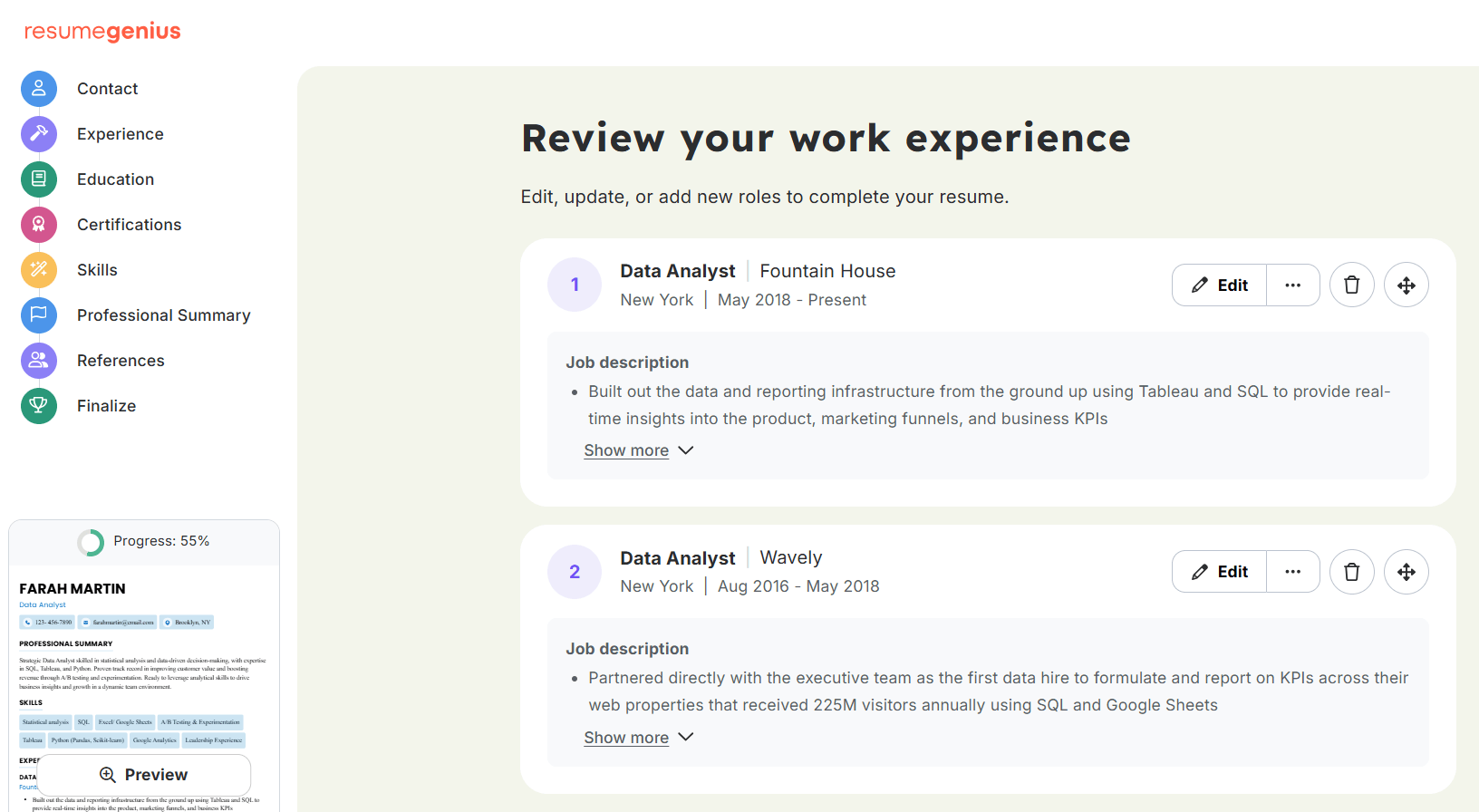
The workflow to build a resume is smooth and fun to use, complete with guided navigation, which makes setting up a resume intuitive. However, there are some drawbacks to the experience that may deter some users.
Pros:
- Resume Genius is flat-out easy to use
- Resume Genius guides first-time users through the workflow, explaining what to expect on each page and demonstrating how to add a section, change formatting, and more
- While you can’t edit your resume in-line, you can preview the resume in the bottom left-hand corner
Cons:
- There is no resume score or analysis to suggest improvements
- Formatting options feel clunky and dated, particularly the font size choices that are limited
- Depending on what we were doing, we didn’t find it easy to navigate back to the main dashboard; for instance, while building a resume, there is no clear way to return to the dashboard unless you navigate all the way to the finish page
AI features and accuracy: 2 of 5 points
This is where we really felt Resume Genius was lacking. AI feels like an afterthought tacked on to elements in the builder, rather than being a thoughtful and useful integration.
Pros:
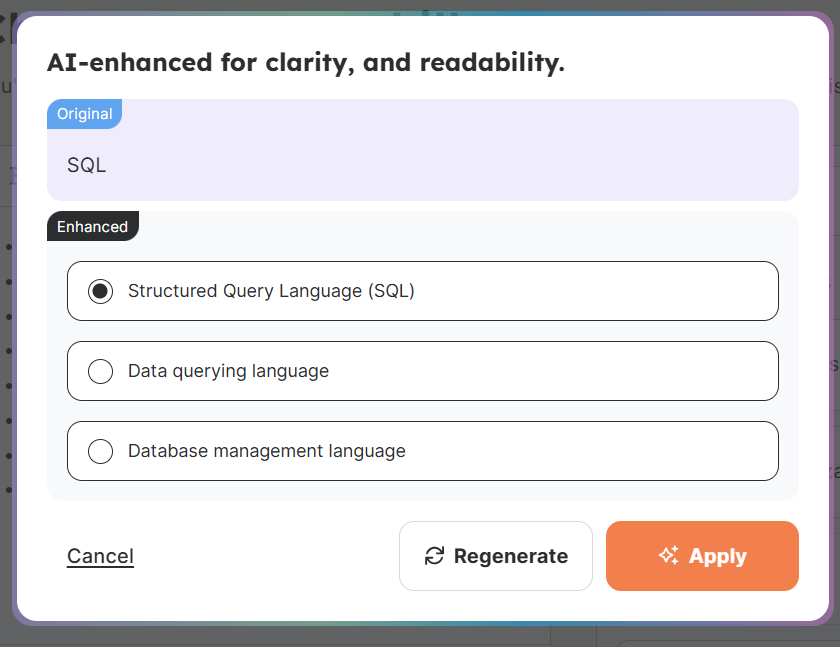
- Users can enhance their skills with AI, which can be helpful if they need a new way to say something (for instance, instead of “SQL,” the enhancer suggests “Data management using SQL” or “Database querying with SQL”)
Cons:
- When filling out your experience section, you can choose from Resume Genius’ pre-written bullet points, but there is currently no AI enhancement or generation here (to be clear, Resume Genius doesn’t claim they’re using AI in this section)
- Speaking of the pre-written bullet points, these suggestions tend to be generic, don’t include metics, and provide no discussion around why those points work for the job seeker’s experience
- Pre-written skills take up more real estate than the suggestion to enhance those skills with AI
Template quality and flexibility: 5 of 5 points
Resume Genius has a large variety of templates to choose from, and they even walk you through a series of questions to help you choose the best template according to your experience and education.
The creators of Resume Genius have put a lot of thought into the power of color selection, too, curating color palettes based on both creative and more traditional roles.
Free vs. premium value: 3 of 5 points
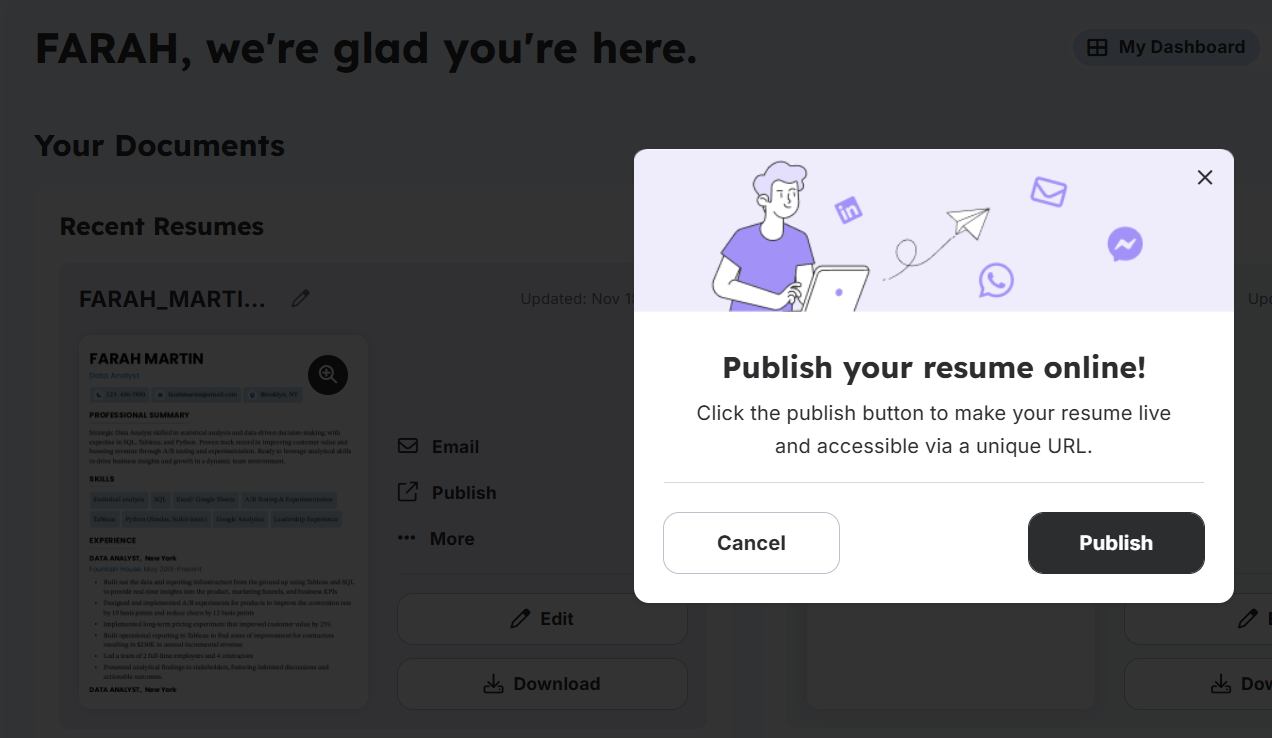
We were prompted to create a free account after inputting contact details (first section in the workflow), so this was unexpected and felt a little jarring. We declined the free account and were able to finish building the resume.
Unlike the initial prompt to sign up for an account that was unexpected, we came across a more natural, expected prompt to upgrade when we clicked to download the resume.
Additionally, Resume Genius’s pricing page claims they offer a resume checker/score and an expert resume review with a paid account. We couldn’t find these features anywhere at the time of our review (and we did purchase a subscription).
Free:
- Access to basic resume templates
- AI features, including the skills and summary generator
- Download in TXT format
Premium:
- Access to premium resume templates
- Unlimited downloads in Word, PDF, or TXT
- Access to the cover letter builder
- Digital resume to share with friends and family for feedback
- Access to their job board
Support and resources: 5 of 5 points
Users can get help in multiple ways, and Resume Genius’s Trustpilot reviews speak to their level of attention in taking care of their customers.
Pros:
- Available by email, phone, and live chat
- Transparency about communication turnaround time (1-2 business days)
- Resources available within the platform to provide guidance on building resumes, including blog content and videos
Extra tools and features: 3 of 5 points
Resume Genius does offer some valuable extras, such as a cover letter tool, a job search platform, and a shareable link to solicit feedback on your resume from peers.
However, as we mentioned in our review of the platform’s free versus paid features, there’s a discrepancy between what Resume Genius claims to offer and what’s actually available on their platform. Neither a resume checker nor an expert review is part of the resume-building experience, at least from what we could tell at the time of our review.
#8. Resume.io
Quick verdict: Resume.io is easy to use and offers helpful AI writing tools at a reasonable price. However, the AI-generated content needs improvement, and some templates provide limited customization.
Ease of use and experience: 3 of 5 points
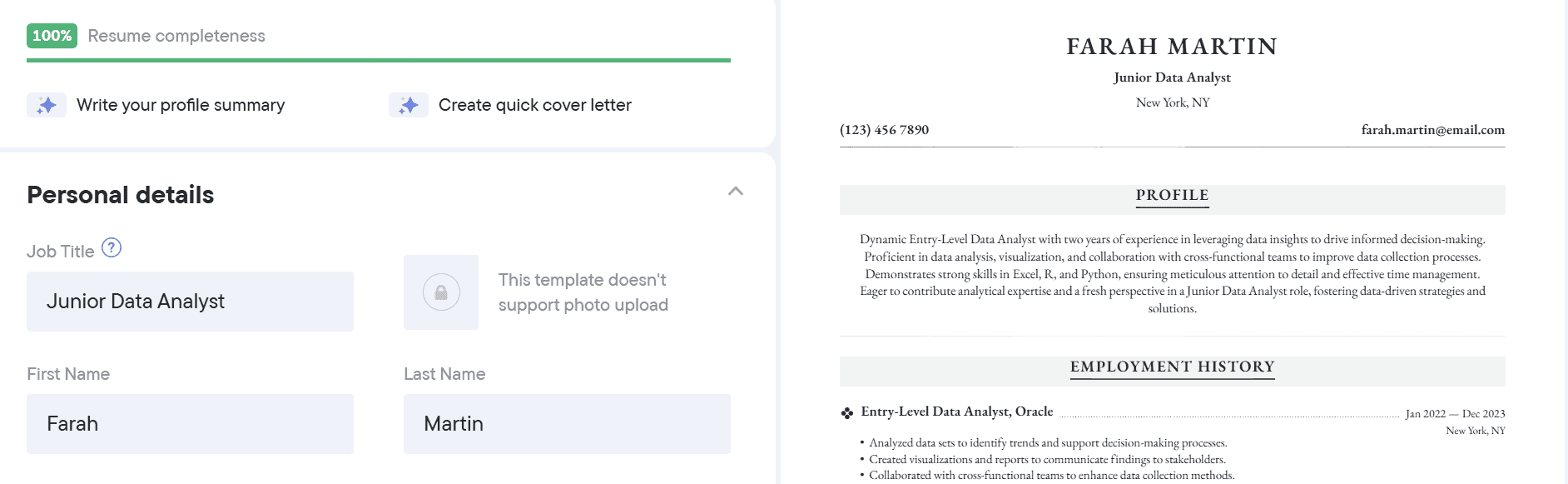
Resume.io makes it easy to build a resume step-by-step with intuitive navigation from one section to the next. We appreciated the platform’s real-time stats (like learning that resumes with a phone number and email have a 64 percent higher chance of receiving feedback). The resume completeness tracker is another helpful touch.
However, the interface lacks modern user experience features. It does not support in-line editing, offers limited layout customization, and includes outdated prompts (such as nationality and date of birth) that may mislead first-time users about appropriate content for a resume.
Pros:
- No sign-up required to build a free resume
- Precise step-by-step user flow with helpful data points
- Real-time completeness percentage keeps users on track
Cons:
- No in-line editing breaks the editing flow
- Outdated interface and limited layout flexibility (for some templates)
- Prompts for personal information, such as nationality and date of birth, do not follow current resume best practices
AI features and accuracy: 2 of 5 points
AI content generation feels like an afterthought on Resume.io. While the platform offers AI-generated bullet points for work experience, the results were extremely generic and could apply to almost any job. The pre-written phrases were slightly better, but they lacked role-specific tailoring, which required us to heavily rewrite most of the content.
Work experience section:
- AI-generated bullets were vague and non-specific to the role and industry
- Pre-written phrases offered limited relevance but no customization
- We ended up writing our own content for accuracy and impact
Skills section:
- No AI support at all; everything had to be filled in manually
Resume summary:
- This was the only area where AI added value
- The generated summary provided a decent base, though editing was still required to align it with our experience and goals
Template quality and flexibility: 4 of 5 points
Resume.io offers a diverse range of resume templates, catering to various industries, experience levels, and design styles. Most templates look clean and are easy to use for all career levels.
However, some templates have optional fields for photos, zip codes, or dates of birth. Including photos can reduce ATS (Applicant Tracking System) compatibility, and none of the mentioned optional fields match US resume standards. This meant we had to carefully review the templates before selecting one that was suitable.
Free vs. premium value: 5 of 5 points
We were able to build an entire resume for free—no sign-up required. That’s generous, especially considering we got access to all sections, templates, and even a basic AI resume review. While we couldn’t download the resume without upgrading, we still walked away with a clear mental picture of what worked and what didn’t.
Premium access unlocks more AI functionality, extra templates, and bonus tools, though nothing we’d call ground breaking.
Free:
- Build a resume with all sections
- Access to available templates
- AI resume review
- Limited AI content generation (token-based)
- Basic resume completeness score
Premium:
- Unlimited templates, resumes, and cover letters
- Unlimited AI content generation
- Job match score
- Unlimited access to resume-building courses
Support and resources: 4 of 5 points
Resume.io makes it easy to find help. Support includes a contact form and a strong library of videos, articles, and podcasts. Trustpilot reviews reinforce the platform’s reputation for fast and effective customer service.
However, support seems lacking, as there is no direct way to email or call the company.
Extra tools and features: 4 of 5 points
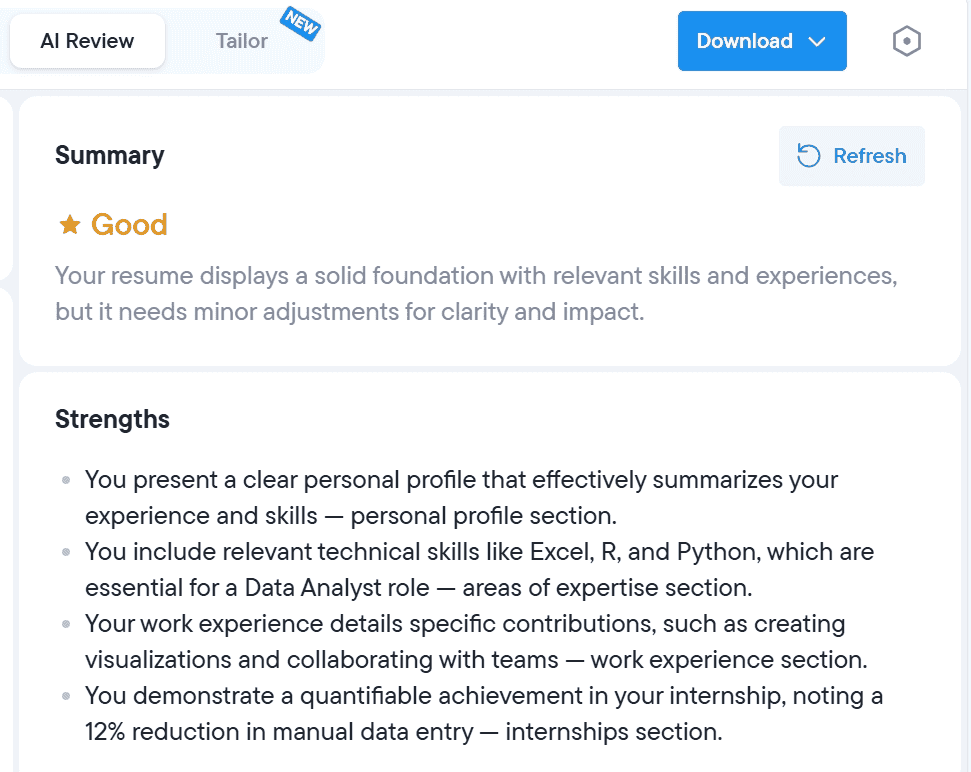
Resume.io offers a thoughtful set of extra tools, with several standout features. The AI-powered resume review impressed us. Once our resume was complete, we generated a report that highlighted our strengths, areas for improvement, and expert tips.
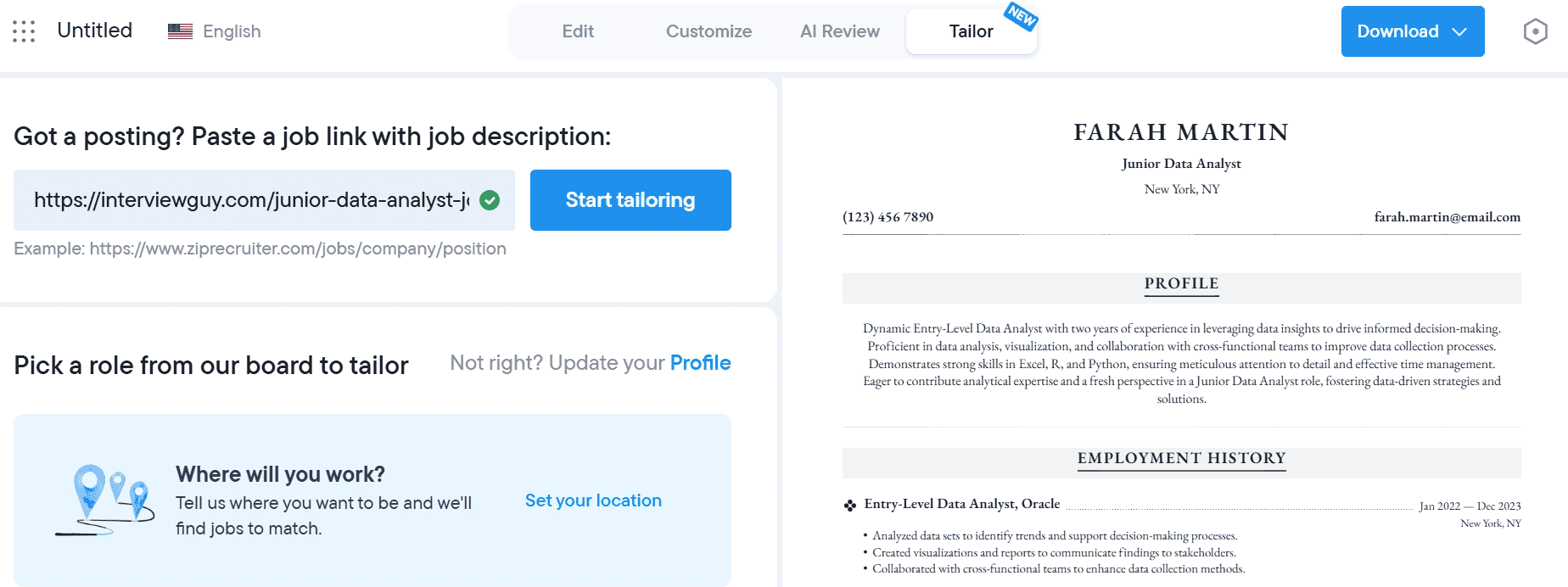
The “Tailor” feature was another highlight. After pasting in a job description URL, we received a match score and a breakdown of missing skills. We dismissed a few suggestions for skills we already had, but added others that genuinely improved our resume.
Lastly, the “Interview Prep” tool added real value. After entering the job title and company, the system generated sample questions and even simulated a mock interview session using our webcam (although it couldn’t pick up our microphone and camera). While the questions were general, they provided a solid starting point for preparation.
#9. Rezi
Quick verdict: Rezi offers valuable features and AI tools, but navigating the resume builder isn’t always intuitive. We encountered a couple of glitches that also took away from the experience.
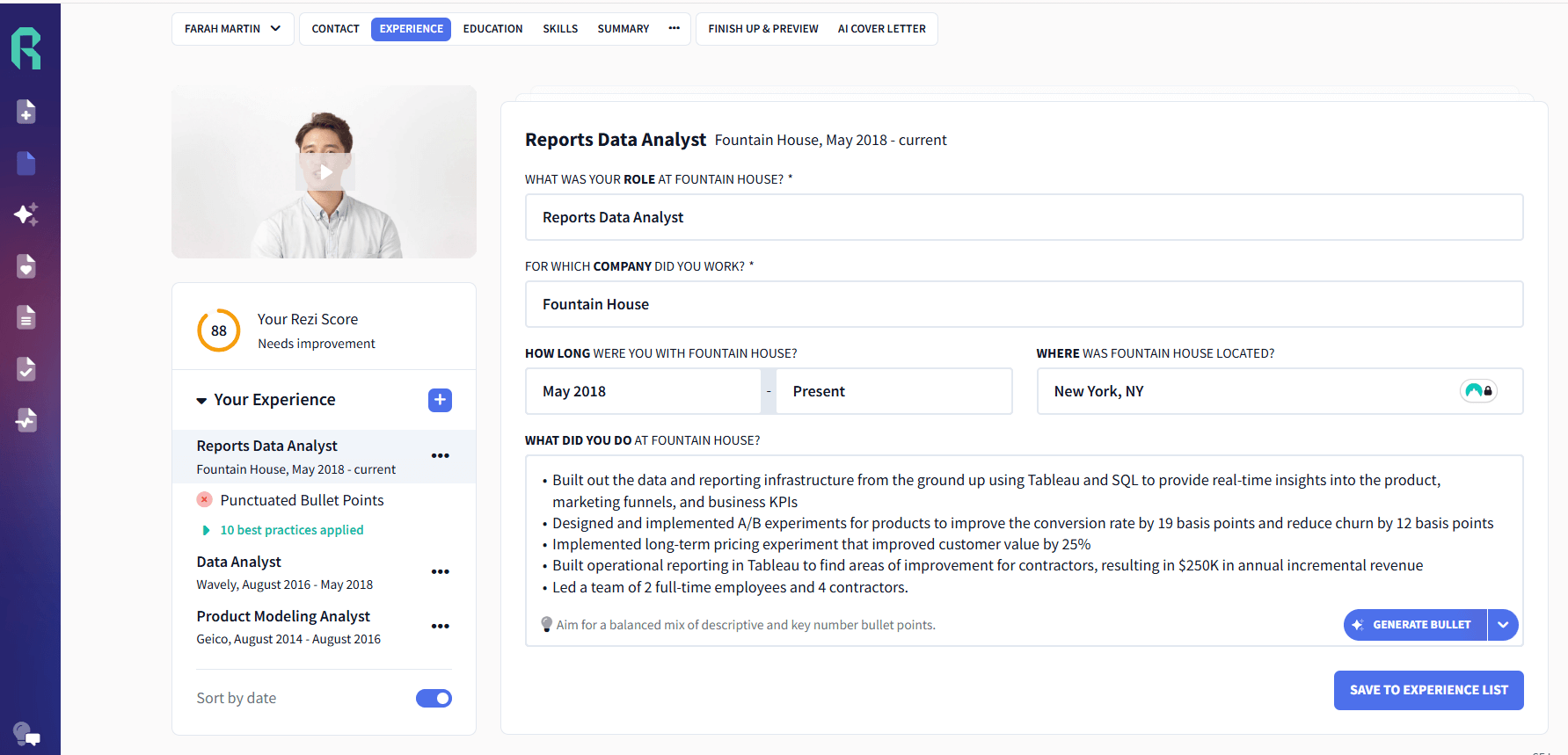
Ease of use and experience: 3 of 5 points
While the resume builder offers value, it wasn’t immediately clear how to navigate through the platform. There is also no preview of your resume while navigating through each section, so you’re not sure what your edits look like until you arrive on the finish page.
Pros:
- Edit your resume inline like a Google Doc on the finish page
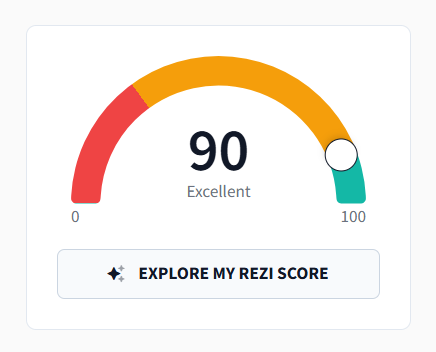
- Watch your Rezi score improve as you make changes
- Use auto-adjust, a cool feature, that fits your content to the page and makes your resume look nice
Cons:
- You can import your resume from LinkedIn, but it’s a clunky process, requiring you to first download an extension, and users who prefer browser-based document editing may find a simpler workflow in tools like Google Docs
- Not immediately clear how to navigate to the next section
- Not immediately clear if you should add all bullet points simultaneously or one at a time
- Not immediately clear how to rearrange sections
- You can add sections, but again, this isn’t clear where this feature lives
AI features and accuracy: 3 of 5 points
Rezi’s AI does generate high-quality bullet points, but it’s not immediately clear whether the tool is rewriting your existing points or adding new ones.
Pros:
- AI generation is relevant and seems to use the STAR framework to emphasize actions and results
- Generates from scratch based on keywords that are missing from your resume
Cons:
- We didn’t see a way to optimize existing bullet points
- The AI skills explorer is an interesting feature, but requires the user to fill out some information first before receiving suggestions
Template quality and flexibility: 3 of 5 points
Templates are simple and easily changed out for a different one in the builder. There aren’t many to choose from, which is fine, but since there isn’t a lot of variety among template choices, this part of the experience is a bit lackluster.
Free vs. premium value: 4 of 5 points
There’s no question that Rezi is giving job seekers a lot of value for free before prompting them to upgrade.
So why not a full five points? We experienced some confusion about what is actually free and what’s paid, as our experience didn’t always line up with Rezi’s pricing page. We’re not sure if it was a bug or a test Rezi was running at the time, but we were under the impression that you could only create one resume for free before being prompted to upgrade. We created multiple for free (not a bad problem to run into if you’re not planning to upgrade).
You can find out more on their pricing page, but here are some things you can expect for free and with a premium subscription.
Free:
- Create one resume
- Get three free downloads
- Limited Rezi score feedback
Premium:
- Unlimited resume creation
- Unlimited downloads
- Access to all templates
- Full Rezi score feedback
- Full AI features
Support and resources: 4 of 5 points
Rezi has supportive customer service and an online community where users can get help. Rezi’s Trustpilot reviews often praise their customer support.
Pros:
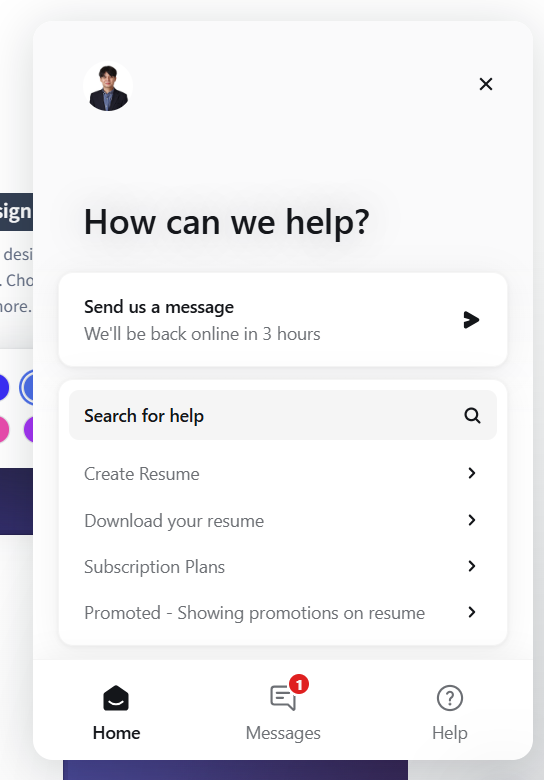
- Rezi’s chat feature is accessible on every page
- Chat with customer support, find how-to guides, or get help with your account
- Rezi links to their Reddit community, where users can talk with one another and get support
Cons:
- Chat support seems to be the only way to contact the company, and they aren’t always online, which means support won’t be instant
- During one session of using Rezi, we were unable to find the chat feature. A few minutes later, it reappeared.
Extra tools and features: 4 of 5 points
Rezi offers some great extras that can really make a difference while applying for a new job. You can generate a cover letter, get feedback on your resume with the Rezi score, share your resume with others with a viewable link, search for jobs, and even practice interviewing with AI.
The AI interview tool is particularly unique in that it asks questions based on the job you want, you can practice answering, and receive feedback. However, the feedback does feel formulaic and robotic. For instance, it prioritizes keeping the answer within a certain length over the quality of the response.
#10. Huntr
Quick verdict: Huntr offers an intuitive and easy-to-use resume builder with all the key features a job seeker needs. Navigation is easy, even for first-time users, but the interface is cluttered and could use some breathing room.
Ease of use and experience: 4 of 5 points
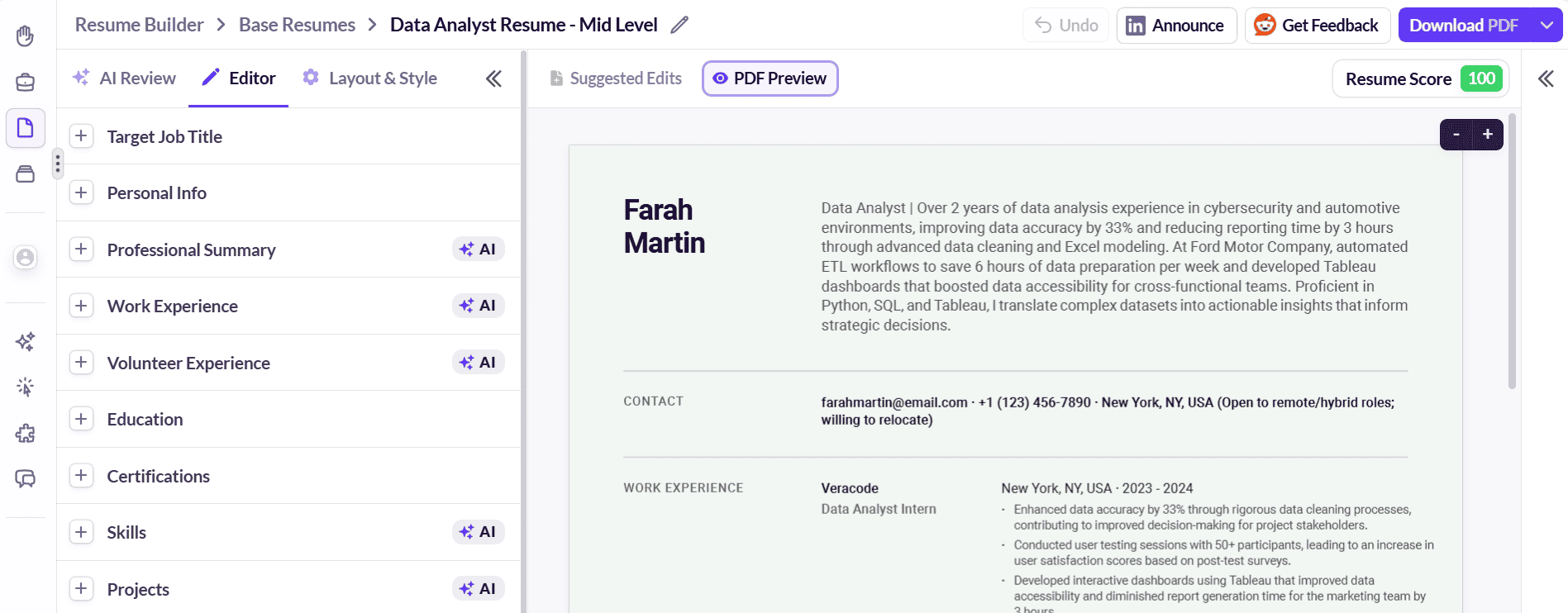
Building the resume section by section felt easy and natural with straightforward navigation from start to finish. Nevertheless, we experienced a few lows that hurt the overall user experience.
Pros:
- Easy to navigate the builder step by step
- Clear guidance on what’s needed for each section to be complete
- Layout and styling give the user adequate editing and adjusting control
Cons:
- Editing on the sidebar and not on the actual resume took away from the real-time experience
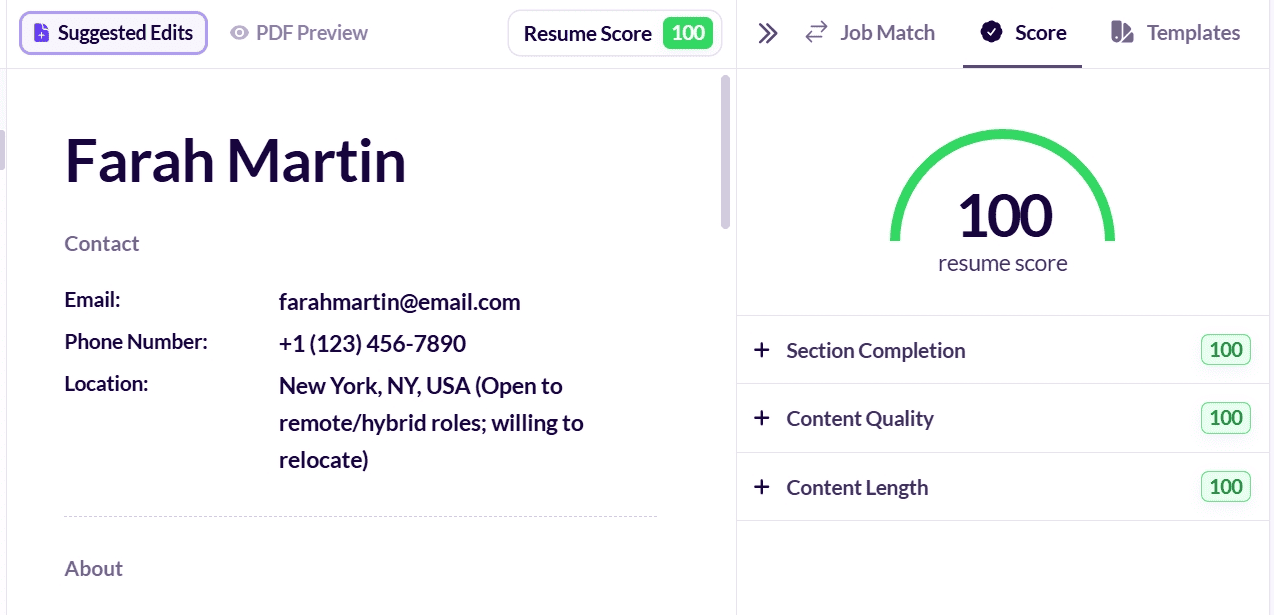
- The resume score helps, but its parameters (resume completeness, quality, and length) aren’t exhaustive
- Format settings are so deeply buried at the bottom of the “layout & style” menu that users can’t find them easily
AI features and accuracy: 3 of 5 points
Huntr has done an impressive job of leveraging AI to generate job description bullet points and resume skills. Both are in real-time and at a significant level aligned with the role. However, the outputs will require some fine-tuning to be ready for use.
Pros:
- Having to choose a context keyword for a bullet to be generated guarantees a good level of resume/role customization
- The bullet point match score for the target role is a great inclusion to further tailor the resume to the industry and specific job
Cons:
- All AI-generated bullets included metrics (%), but many of them weren’t realistic numbers
- Significant editing, especially to integrate skills, is required to make bullet points usable in a resume
- Some of the AI-suggested skills are broader terms; for example, for a junior data analyst role: “Data translation” or “Data storytelling”
Template quality and flexibility: 2 of 5 points
Huntr doesn’t offer many options for resume templates: You only get seven, with two of those coming in only two color themes.
Even with those seven options, you can’t help but feel like you’re repurposing the same template with minor layout changes. It felt static and lacked creativity switching from one template to another without much noticeable difference.
Free vs. premium value: 3 of 5 points
We signed up for a free account, and our journey started with entering a target role and years of experience. Then came the option to upload an existing resume or build one from scratch. We chose the latter, followed the next steps that flowed naturally, until we reached the halfway mark in the first job description, at which point, the prompt to upgrade ended our free run. Although this was expected at some point, it arrived sooner than anticipated.
We rate this segment three out of five stars because we were unsure of what we would receive after paying. We had little to go by from the free access and only hoped that the final product would be worth the money we paid for pro access. In the end, we got value for our money from the premium features and the end product.
Free:
- Upload an existing resume
- Start building one from scratch up to halfway through the first job description
- Five free AI-generated work experience bullet points
- Basic resume score
Pro:
- Unlimited access to the resume builder
- Access to the cover letter generator
- AI resume review report
- Resume and cover letter download
- Full access to AI review results
- Unlimited AI resume generations (bullets, summary, and skills)
- Job tracker
Support and resources: 4 of 5 points
Support and resources are available in the form of AI chat, messaging, articles, and a Reddit community.
Pros:
- Instant AI chat is a big help
- Availability of articles to answer common questions
Cons:
- Finding an email address wasn’t intuitive or quick, but we found it hidden at the bottom of the main site’s footer
Extra tools and features: 3 of 5 points
Huntr offers a suite of tools designed to streamline job hunting (no pun intended). You can generate cover letters to complement your resume, get AI-powered resume suggestions, and track applications in one place.
For us, one standout feature is the role-industry-specific match score for your target job title, which helps fine-tune your resume to better align with the job description and what recruiters are likely looking for. However, the major downside of most of the AI-generated output is that it’s often superficial, and you have to edit it to articulate your experiences and achievements in a personalized way.
Key Takeaways: Choosing the Best Free Resume Builder
No resume builder is perfect, but the right choice depends on what you value most. While some platforms prioritize extra tools like AI interview prep, others focus more on quality AI-powered recommendations. The biggest differences we found among the builders we evaluated centered on user experience and navigation, the quality of AI-generated content, and how much value job seekers receive before being asked to upgrade.
Based on our evaluation of ease of use, high-quality AI recommendations, and strong value in the free version, BeamJobs delivered the most balanced experience overall. Other resume builders may appeal to job seekers who want lots of template choices or additional job search features, but often require more hands-on editing to get the same quality.
We methodically tested every builder on this list, ranking them across six weighted categories, not with marketing claims or feature lists. The FAQs below may help you further understand how resume builders work, how AI is integrated into these tools, and what an HR manager may care about, so you can decide which platform makes sense for you.
How to choose the right resume builder
Here are some questions and guidance to help you think about what matters most to you in a resume builder:
- Do you struggle to make your resume stand out to the competition? Choose a builder with strong, AI-powered tools and that can tailor your resume to a specific job posting. The main goal is to improve your odds of landing your dream job. Intuitive drag-and-drop sections help customize resumes for different applications.
- Don’t know how to write impactful job achievements? Choose a builder that offers spelling and grammar checks along with content suggestions to help produce a great resume while cutting down on time writing from scratch.
- Are you interested in complementary features like interview prep, job boards, and job tracking? Choose broader platforms.
- Do you prefer simplicity as opposed to heavy customization? Choose a builder with easy navigation and a clean look.
- Not sure which template to pick? Select a builder that offers a range of professional designs for various industries, such as a graphic designer template.
- Are you on a tight budget? Choose a builder that provides meaningful value before requiring an upgrade.
Resume Builder FAQs

BeamJobs ranks as the best online resume builder overall based on our weighted evaluation of its user experience, AI features, quality of templates, and its free-to-paid value.
BeamJobs is easy for users to navigate, its AI offers job-specific suggestions rather than generic filler text, and job seekers can build a complete resume for free. As a rule of thumb, prioritize platforms offering ATS compatibility and pre-written industry templates.
Yes! It’s worth paying for a resume builder. A good resume builder helps you write an ATS-friendly resume specific to the job and cuts down formatting time.
Many of them are cheaper than a professional resume writer/career coach and even offer a completely free version or an inexpensive trial to access premium features. This lets you determine if upgrading can meaningfully improve your resume.
Employers are focused on the content in your resume, not how you created it. Many employers use software to filter resumes automatically, and 88% agree ATS can overlook qualified candidates. Minor resume errors can block candidates, with some sources estimating 75% of applicants fail ATS screening for avoidable mistakes.
If your resume shows why you’re qualified for the role and how you’ve positively impacted the places you’ve worked, employers won’t care whether you used a resume builder or a Word document.
Most of the time, resumes made with resume builders will pass through ATS. Many employers believe ATS scanners reject qualified candidates. Middle-skill workers can be especially vulnerable to ATS rejection.
This is because resume builder companies understand that ATS is a real concern job seekers must contend with, so they design their templates and tools with ATS requirements in mind.
However, some resume builders will include resume templates that are not ATS-friendly, which may be appropriate for job seekers applying to smaller companies that don’t use ATS. If this is the case, a reputable resume builder will clearly label which templates are ATS-friendly, and ATS-friendly resumes avoid images and complex formatting.
The best resume builders integrate AI into their tools because it can be highly valuable. Each builder differs, but in general, AI prompts on the backend of these tools provide suggestions, rewrites, and the generation of work experience bullet points, skills, and summaries.
Keep in mind that the quality and usefulness of these AI features vary greatly among resume tools, and some builders also provide resume samples or hand crafted examples alongside AI suggestions.
We evaluated each resume builder across six weighted categories, including ease of use, AI features and accuracy, template quality, free vs. paid options, support and resources, and extra tools. Each category was scored on a scale of one to five, and our final rankings reflect the combined weighted scores rather than a single feature.

Stephen is the co-founder and CEO of BeamJobs. Frustrated with the challenges he'd faced in his own job search, he left the corporate world to start BeamJobs with his brother. Drawing on firsthand experience with hiring and getting hired as technical talent, he started BeamJobs in 2020 to help qualified job seekers land interviews with less stress. Since then, more than 4 million people have built their resumes and cover letters on BeamJobs. Stephen's insights have been featured in notable outlets, such as Fast Company, Business Insider, Yahoo Finance, MIT, and Zapier. Learn more about Stephen.

